![Zeck-blocks-100-3.png]](https://help.zeck.app/hs-fs/hubfs/Zeck-blocks-100-3.png?height=50&name=Zeck-blocks-100-3.png)
🔔 Who gets notifications and which ones?
Admins and Zeck Owners will get notifications:
- When someone views a published Zeck for the first time.
- When someone comments on a published Zeck.
- When someone requests access to a published Zeck.
- When someone replies to a comment that they left on the published site.
- When they are tagged in a comment.
Any users designated as Members will only get notifications:
- When someone replies to a comment that they left on the published site.
- When they are tagged in a comment.
🔕 Notifications can be disabled on a Zeck by Zeck basis
-
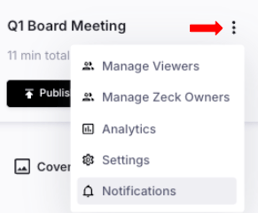
Admins and Zeck Owners can open the Zeck you want to turn notifications off for.
- Click the Three Dots at the top of the Section Navigation
- Select Notifications
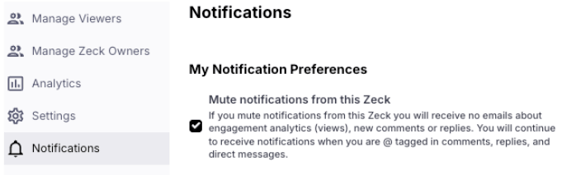
- Check the box to disable notifications for this Zeck
-
- Notifications will be disabled for commenting and first view alerts
- Notifications for tagged comments and request access emails will continue to be sent